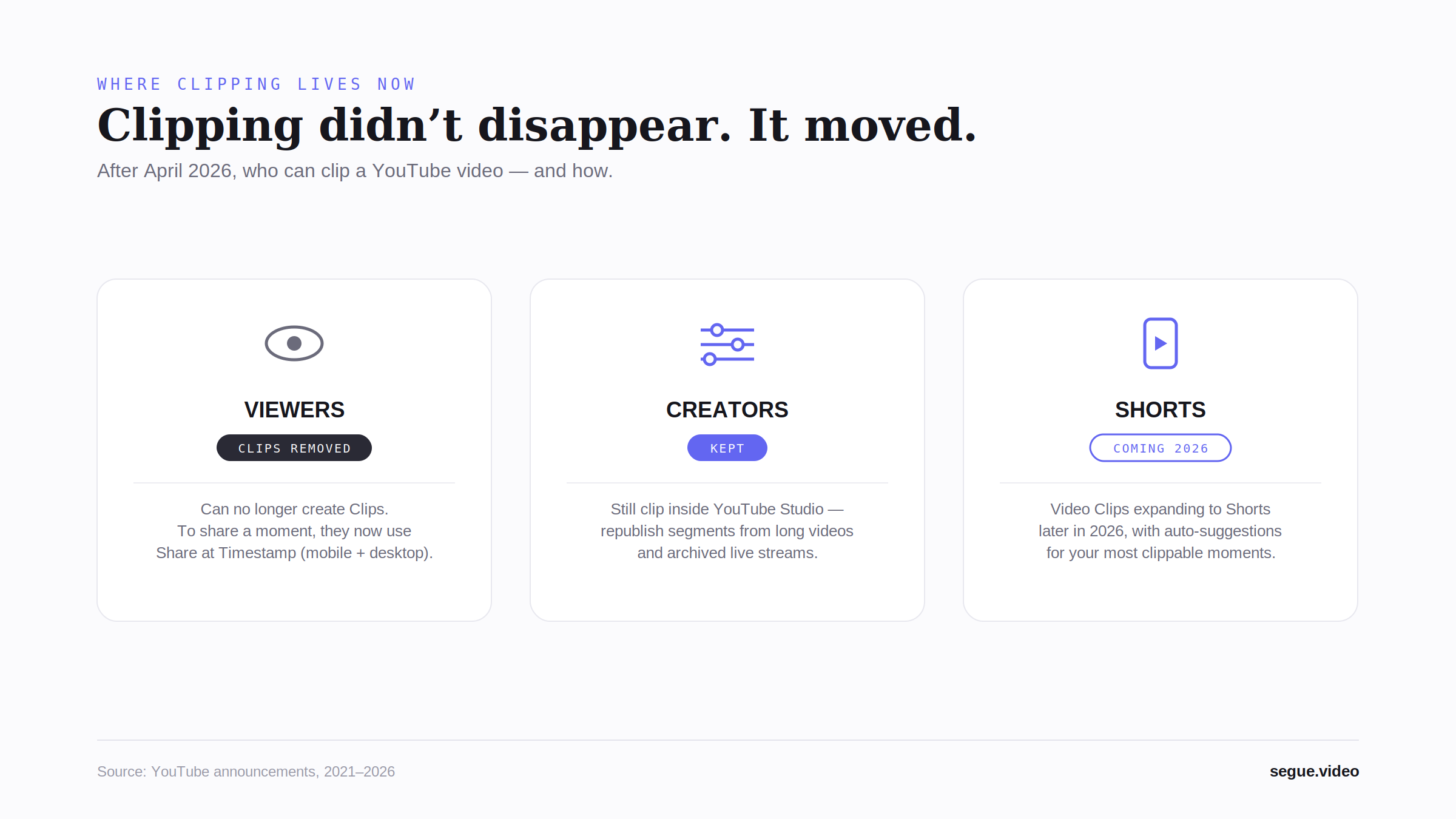
YouTube did not replace Clips with a single feature. The closest first-party analog is Share-at-Timestamp, but it has no end time, no custom title, no dedicated viewer page, and no multi-clip sequencing. Third-party tools fill the gap; Segue is the only one that restores all four in a browser-based, no-account workflow.
This is a field guide for the post-Clips world. If you're searching for "what replaced YouTube Clips," the honest answer is nothing did, in one shot. The practical answer depends on which of the old workflows you used. Below: a quick recap of what shut down, what YouTube wants you to use, what you actually need, and a ranked tour of who fills which slice.
What Clips was and what shut down
The viewer-side Clips feature, introduced in 2020, let any logged-in YouTube user pick a 5-to-60-second range on any public video, give it a custom title, and generate a /clip/<id> URL that opened a stripped-down player focused on that range. Views counted back to the source creator. Discord, X, Slack, and most blog platforms unfurled the URL as an inline player. It was the load-bearing tool for highlight-reel editors, podcast clippers, sports fans, and music supervisors: anyone whose job involved sharing just the good 30 seconds of someone else's video.
YouTube deprecated it on April 17, 2026. The full post-mortem (what was lost, why YouTube probably killed it, the verbatim deprecation language) lives in the pillar post. This page picks up where that one ends: the actual landscape of what to use now. For the sourced record of the retirement itself (dates, the official announcement, and a neutral comparison of every current option), see the retirement of YouTube Clips: a reference.
Old /clip/<id> URLs are effectively dead links. They return either an error or a redirect to the source watch page with no preserved start or end time, which means anything you'd previously embedded in a blog post, pinned in a Discord, or quoted in a tweet has degraded to "watch the whole video and figure out where the moment was." That alone is enough reason to want a replacement workflow, and it's why search demand for what replaced YouTube Clips and YouTube Clips deprecated spiked the week of the deprecation and hasn't normalized.
What YouTube tells you to use now
The deprecation note pointed users at Share-at-Timestamp: the ?t=43s deeplink generated by YouTube's own Share dialog. It does step one of what Clips did: it sets a start time on a watch URL. It does not set an end time. It does not generate a custom title. It does not open a dedicated viewer surface. Recipients land on the full watch page, sidebar of recommendations and all. It does not chain multiple moments into one URL.
For "watch this long video starting at 43 seconds," it's fine. For "watch this 30-second moment," it's a partial answer at best. The full breakdown of what Share-at-Timestamp does, what it leaves on the table, and how to work around the missing pieces lives on the dedicated Share-at-Timestamp alternative page. That's the deep-dive; this guide treats it as one entry on the field.
The third-party gap
The deprecation announcement also named the third-party category: verbatim, "a number of third-party tools with advanced clipping features and authorized creator programs are now available." That's an unusually direct hand-off and it tells you something: YouTube knew Share-at-Timestamp wasn't the whole answer.
What creators actually need that no first-party tool provides:
- End times. Without them, you're sharing the rest of the video starting at the moment, not the moment itself.
- Multi-clip in one share. Three timestamps on one video (or three clips across several) should be one URL, not three.
- A dedicated viewer page. Recipients shouldn't land on the long-form watch page when the point is a 30-second highlight.
- No download, no re-upload. The original creator should keep their view, watch-time, and analytics credit.
- No account barrier. Pasting a URL into a chat is a thirty-second job; signing up shouldn't be the bottleneck.
A real Clips replacement has to clear all five. Anything that clears only some is a partial answer.
The field, ranked
Four entries. Each solves a different slice of what Clips did, and the right pick depends on which slice you actually used.
Segue: the closest functional Clips replacement
RecommendedSegue (this site) is built specifically for the workflow Clips supported: paste any public YouTube URL, set in and out points on a precise scrubber, and share a /m/<slug> URL that opens a stripped-down viewer focused on just the clipped range. The Free tier handles up to 3 clips per mix on a single video, no account required. Pro ($5/month or $29/year) unlocks unlimited clips per mix and multi-video mixing within the same channel: the workflow Clips never had. There's also a launch-window Pro Lifetime SKU at $59 one-time, capped at the first 500 buyers or 90 days; see the pricing page. Segue streams from YouTube, so views count back to the source creator the same as a normal embed. The trade-off vs. native Clips: it's third-party, so the source channel gets credited in the viewer footer rather than in YouTube's own UI. See the head-to-head for the parity-vs-deprecated-Clips angle.
AI auto-clippers: Opus Clip, Vizard, VEED
These tools scan your own long-form video, identify moments likely to perform as Shorts, and re-export them as vertical 9:16 MP4s for upload to TikTok, Reels, and Shorts. They're excellent at that job, and they belong on this list because a chunk of search demand for "what replaced YouTube Clips" is actually creators looking for auto-discovered short-form output rather than a viewer-side clipping tool. They are not Clips replacements: they don't generate a player URL into someone else's video. They generate exported MP4s that you publish to your own channel. Reach for them when you have a long-form catalog and want AI to fish Shorts-format extracts out of it. Skip them when you want to share 30 seconds of a podcast you didn't record in a Discord channel. That's a different job entirely.
Browser-based editors: CapCut Web, Kapwing
Full timeline editors that run in the browser. They handle download (sometimes, terms of service vary), trim, transitions, captions, and re-export. They're powerful and they cover the "I need a re-edited MP4 file" use case completely. The cost is workflow weight: you're downloading the source, opening an editor, trimming, exporting, then re-uploading to your own host or back to YouTube. The original creator loses view-count attribution because plays now go to your re-upload, not the source. And the round-trip is several minutes per share, not seconds. Reach for them when you need an actual edited file (offline use, archival, a deliverable for someone else's platform). Skip them when the goal is a player URL into the source video. They're aiming at a different shape of artifact.
The &end= URL trick
A back-compat YouTube quirk: embedded player URLs of the form https://www.youtube.com/embed/<id>?start=12&end=43 do honor an end time. The watch URL with ?t=12&end=43 does not. The player on the watch page ignores end. The trick works only if you're embedding the player yourself in markup you control (a blog post, a Notion page, a custom site) and the platform you're posting to doesn't strip the parameter on unfurl. The native YouTube Share dialog won't generate &end= for you, and pasting an embed URL into Discord typically expands the full video without honoring the end. Useful in niche embed contexts; useless for paste-into-chat sharing. Worth knowing about; not a workflow.
Recommendation by job
If you're sharing a moment from someone else's public video (a podcast quote, a sports highlight, a music drop, a streamer's reaction), pick Segue. It's the only entry on the field that does the original Clips workflow end-to-end without a download, an account, or a dedicated host. If you're a creator making your own Shorts from your own long-form catalog, pick an AI auto-clipper. If you'd rather hand your audience one link to the best moments across your own channel than a stack of Shorts, a best-of reel from your own channel is the curation version of that job. If you need an actual edited MP4 deliverable, pick a browser-based editor. The &end= trick is a footnote: useful when you control the embed markup, otherwise irrelevant.
Recreate your old workflow
Old Clips muscle memory transfers cleanly. Paste a YouTube URL into the studio, mark in and out points, share the /m/<slug> URL Segue generates. Free tier on the first 3 clips per mix, no account, no install. The whole loop is just three steps. And if you're holding saved /clip/ URLs from the retired feature, paste them in as-is while signed in: Segue imports each clip's start and end points automatically.
Recreate your old workflow on Segue. →
Skip the comparison shopping.
Open Segue, paste a YouTube URL, set in and out points, share one link. Free tier, no account.
Frequently asked questions
Did YouTube replace Clips with anything?
Not with a single feature. The deprecation note on April 17, 2026 pointed users at the existing Share-at-Timestamp UI and at the broader third-party clipping ecosystem: verbatim, "a number of third-party tools with advanced clipping features and authorized creator programs are now available." Share-at-Timestamp covers exactly one of the five things old Clips did: it sets a start time on a watch URL. There is no first-party replacement for end times, custom titles, dedicated share pages, or multi-clip sequencing. YouTube tacitly conceded the gap by naming the third-party category in the same announcement.
Is Share-at-Timestamp the same as Clips?
No. Share-at-Timestamp is a deeplink. It carries a ?t= start parameter and that's it. Old Clips set both a start and an end time, generated a custom title, minted a dedicated /clip/<id> viewer page, and counted views back to the source creator. Share-at-Timestamp does step one only: it lands viewers on the full watch page at a timestamp, with no end-time control and no curated viewer surface. For "watch this video starting here" it's adequate; for "watch this 30-second moment" the gap is the whole story.
What's the closest replacement for YouTube Clips in 2026?
Segue is the closest functional replacement and the only browser-based, no-account workflow that restores end times, multi-clip sequencing, and a dedicated /m/<slug> viewer page. The free tier handles up to 3 clips per mix on a single video. Pro ($5/month or $29/year) unlocks unlimited clips per mix and multi-video mixing within the same channel; a launch-window Pro Lifetime SKU is $59 one-time, capped at the first 500 buyers or 90 days. AI auto-clippers like Opus Clip target a different job (auto-finding Shorts moments in your own long-form videos) and don't generate a player URL into someone else's video.
Can I still set an end time on a YouTube share link?
Not from YouTube's Share dialog. The dialog only generates a ?t= start parameter. Embedded player URLs of the form https://www.youtube.com/embed/<id>?start=12&end=43 do honor an end time, but only if you control the embed markup yourself. Pasting an &end= URL into Discord, X, or Slack typically drops the hint when the platform unfurls the link. For paste-into-chat sharing, a third-party tool that handles the end-time on its own viewer page (like Segue's /m/<slug>) is the only working option.
Are AI clippers like Opus Clip a Clips replacement?
No. Different job. Opus Clip, VEED, and Vizard scan your own long-form video, identify moments likely to perform as Shorts, and re-export them as vertical 9:16 MP4s for upload to TikTok, Reels, or Shorts. They're aimed at creators with their own catalog who want auto-discovered short-form output. Old Clips, by contrast, was a viewer-side tool for picking a moment in someone else's public video and sharing a player URL. The two workflows don't overlap; Opus Clip won't help you share 30 seconds of a podcast in a Discord channel.
Will my old `/clip/` URLs still work?
No. As of the April 17, 2026 deprecation, existing /clip/<id> URLs return either an error or a redirect to the source watch page with no preserved start/end timing. YouTube did not commit to a long-tail redirect plan that honors the original clip range, and as of this writing the URLs are effectively dead links. If you have old /clip/ shares embedded in a blog or pinned in a Discord, they need to be regenerated via a third-party tool. Segue's /m/<slug> is a drop-in surface for the same workflow.
Do views still count toward the original creator?
Yes, when the third-party tool streams from YouTube rather than re-uploading the source. Segue does this. Every clip play registers as a normal embed view against the source video, with the same watch-time and analytics credit a regular embed would generate. There's no re-upload, no re-encode, no re-host. The one limit: if the creator has disabled embedding (most haven't, but some music labels and sports rights-holders do), the video can't be clipped here or in any tool that embeds it. Re-upload-based workflows like manual download + edit lose the attribution entirely.