Last updated: July 31, 2026 · Facts sourced below; corrections welcome at [email protected]
On April 17, 2026, YouTube retired the viewer-facing Clips feature: the tool that let anyone share a 5–60 second bounded segment of a video as its own link. For viewers, it was replaced by Share at Timestamp, which sets a start point but no end point. Creators retain a separate clipping tool, Video Clips, inside YouTube Studio, and YouTube has announced an expansion of Video Clips to Shorts for later in 2026. Existing clip links made before the retirement continue to play.
What was retired, and when
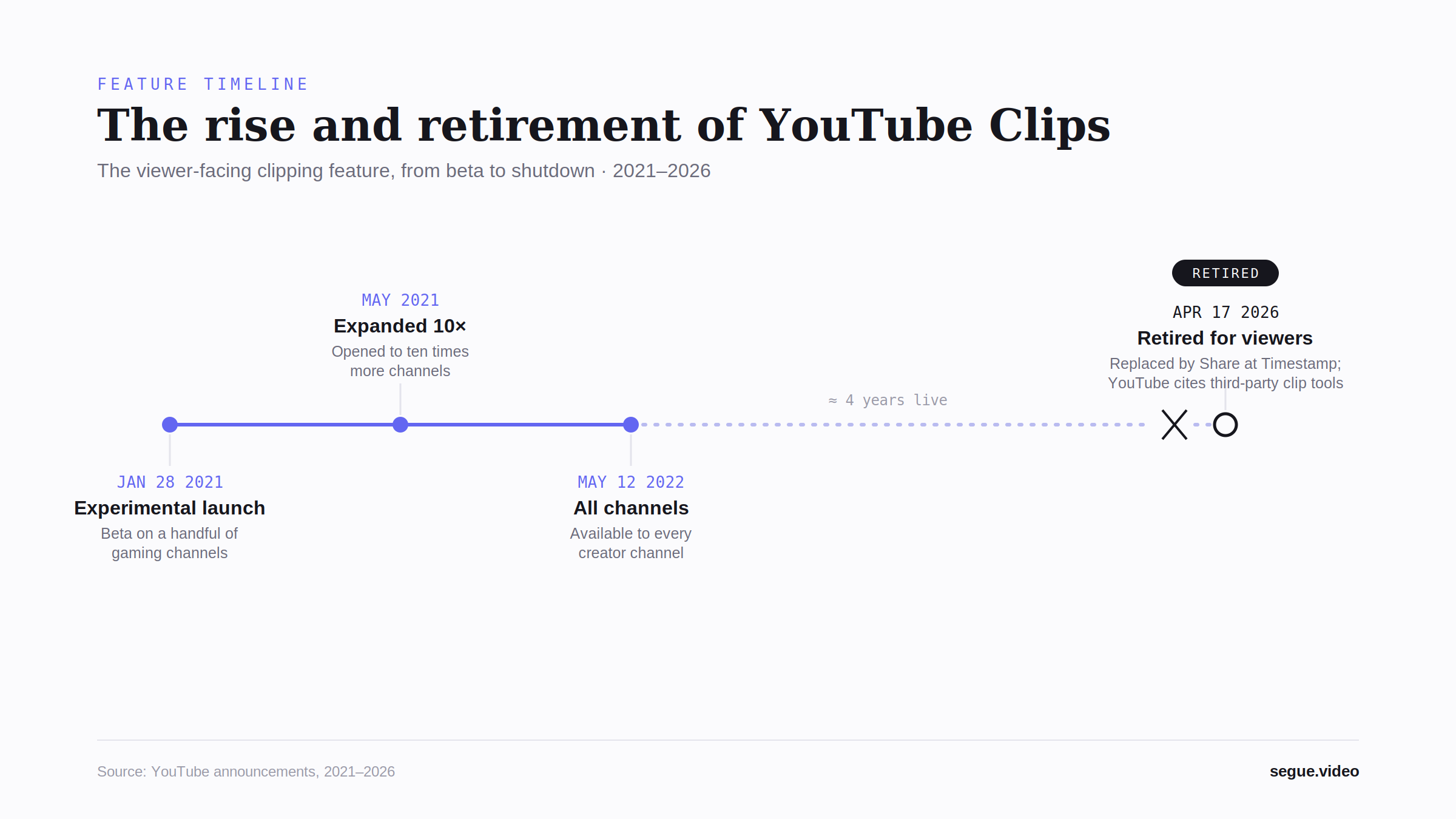
YouTube Clips launched as an experiment on January 28, 2021, available on a small set of gaming channels on desktop and Android. A viewer could select a segment of a video between 5 and 60 seconds long, give it a title, and share it as a looping excerpt that lived on top of the original video rather than as a re-upload. The original video kept the view.
In May 2021, YouTube expanded the test to a substantially larger set of channels, and on May 12, 2022, Clips became available across creator channels generally. The feature remained in place, largely unchanged, for roughly four more years.
On April 17, 2026, YouTube announced the retirement of the viewer-facing Clips feature. The announcement was published by Carlos of TeamYouTube in the YouTube Help Center Community forum. Viewers can no longer create new clips; the clip icon has been removed from the player.
Clip links created before the retirement were not deleted. Existing youtube.com/clip/... URLs continue to play their bounded segments. What was removed is the ability for viewers to create new ones.
Can't find the Clip button? That's expected
If the clip icon is no longer under a video, or you had it before and it is now gone, nothing is broken on your end. YouTube removed the viewer-facing clip button for everyone on April 17, 2026. It is not hidden in a menu, tied to a setting, or limited to certain videos, and it is not on the website or in the mobile app: viewers can no longer create clips on any surface. The button's absence is the feature's retirement, not a fault with your account. What still works, and what to use instead, is covered below.
Why YouTube retired it
YouTube's stated reasoning was consolidation: two tools (Clips and timestamp sharing) served overlapping purposes, and the platform chose the simpler one. In the announcement, TeamYouTube said the share-with-timestamp option "will become the main way to share specific moments in videos, replacing the Clips feature."
The announcement also pointed to the wider ecosystem, noting the availability of third-party tools with more advanced clipping features as part of the rationale for stepping back from the viewer-facing tool. YouTube framed its own continuing investment in clipping as creator-directed rather than viewer-directed, with development focused on the Studio-side Video Clips tool.
What changed, for whom
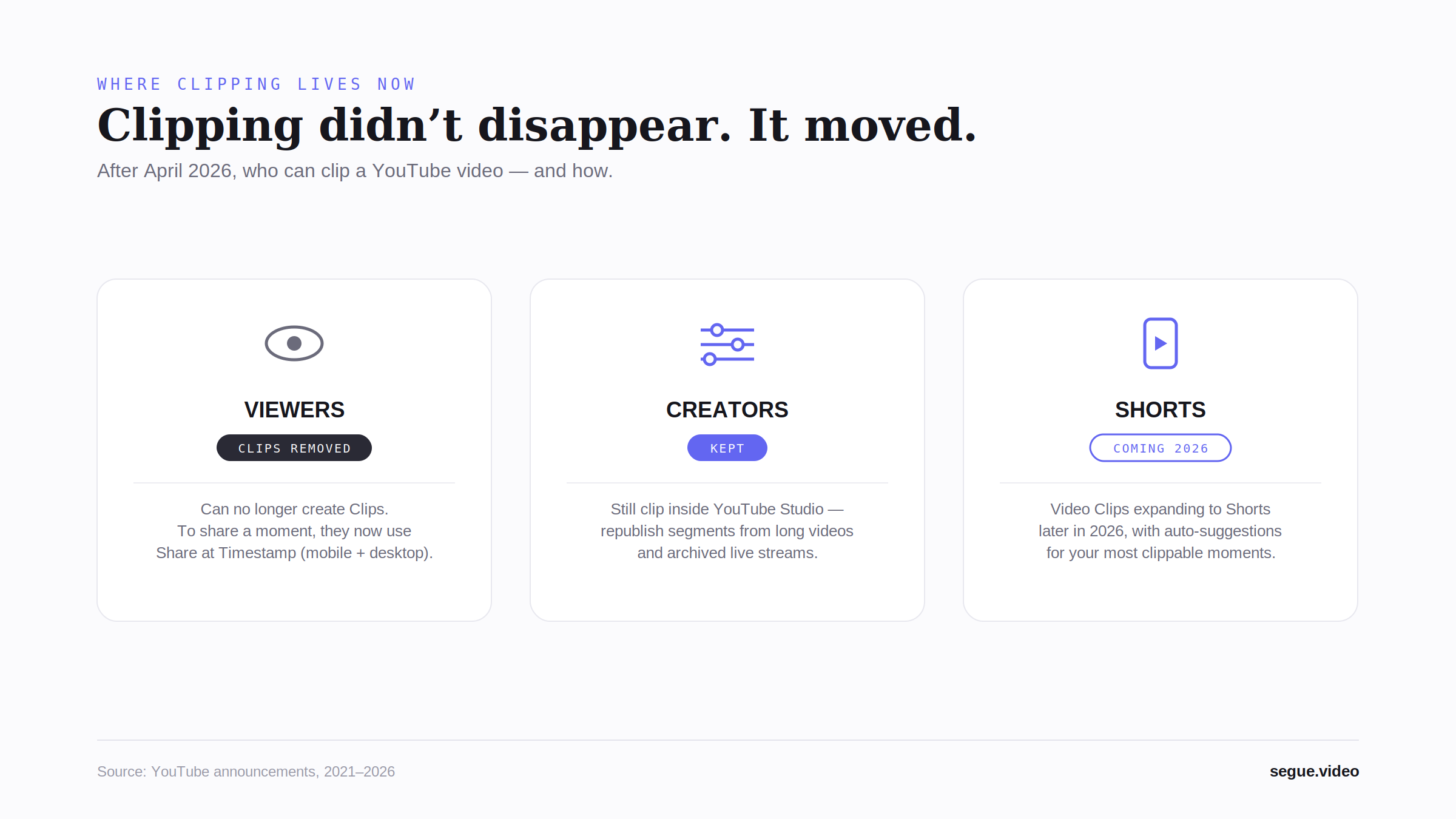
The retirement affected the three surfaces of the platform differently.
Viewers lost the ability to create clips. The native option for sharing a specific moment is Share at Timestamp, which as part of the same announcement became officially available in the YouTube mobile apps on Android and iOS in addition to desktop. Tapping Share beneath a video and switching on the timestamp toggle produces a link that starts playback at the chosen moment.
Creators retain a clipping tool: Video Clips, inside YouTube Studio. It allows a creator to cut segments from their own long-form videos and archived live streams and republish them as standalone videos with their own titles, descriptions, and thumbnails. Segments can be selected via the transcript or by entering timestamps. Alongside the retirement announcement, YouTube introduced AI-suggested clips and an AI-generated transcript outline in Studio, initially limited to English-language podcast content in the United States and Canada.
Shorts is the announced next step. YouTube has said it will roll out Video Clips to Shorts later in 2026, including automatic suggestions to help creators identify their most clippable moments. As of this page's last update, that expansion has been announced but has not shipped.
The functional gap
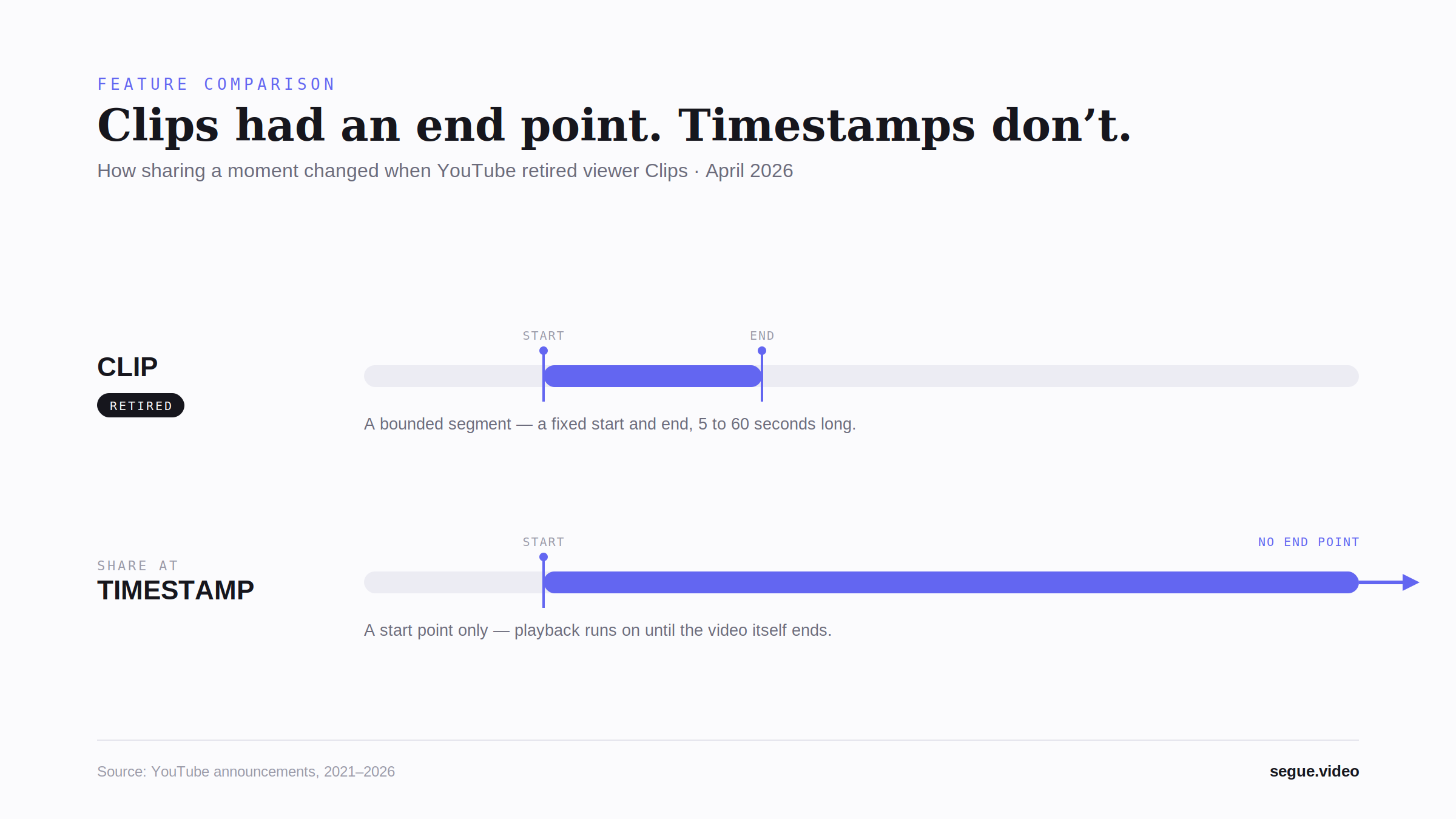
Clips and Share at Timestamp are not equivalent, and the difference is structural.
A clip was a bounded segment: it had a fixed start point and a fixed end point, between 5 and 60 seconds apart, and it carried its own title. A timestamp link has a start point only. Whoever opens it lands at the chosen moment, and playback continues until the video ends. For a two-minute video the difference is small; for a moment shared from a multi-hour livestream or podcast, the recipient is given a beginning with no indication of where the relevant part stops.
This is a capability difference, not a bug: Share at Timestamp was designed as a lighter mechanism. But it means the specific job Clips performed (sharing a moment with a defined end) no longer has a native, viewer-facing equivalent on the platform.
What a youtube.com/clip link is, and whether it still works
The clips viewers created between 2021 and April 2026 live at addresses of the form youtube.com/clip/ followed by a unique identifier. Each one points at a bounded segment of an original video, a fixed start and a fixed end with its own title, and plays on top of the source video rather than as a separate upload. The format dates to the feature's 2021 launch and stayed unchanged through its retirement.
The retirement did not touch these links. An existing youtube.com/clip/ URL still opens and still plays its segment; what was removed is only the ability to mint a new one from the player. If you have an old clip URL you want to keep using, or combine with others into a single link, Segue can import it: sign in, paste the youtube.com/clip/ URL into the studio, and its original start and end come across automatically. You cannot generate a fresh youtube.com/clip/ link on YouTube itself.
Current options for sharing part of a YouTube video
The table below lists the options available as of July 2026, native and third-party.
| Option | Type | Set start | Set end | Multiple clips, one link | No download / re-upload | Works for any public video | No account needed | Free tier | Notes |
|---|---|---|---|---|---|---|---|---|---|
| Share at Timestamp | YouTube native | ✅ Yes | ❌ No | ❌ No | ✅ Yes | ✅ Yes | ✅ Yes | ✅ Yes | Playback continues to the end of the video |
| Video Clips (YouTube Studio) | YouTube native, creators only | ✅ Yes | ✅ Yes | ❌ No | ✅ Yes (republishes as a new upload) | ❌ Own content only | ❌ Creator account | ✅ Yes | Long-form videos and archived streams; AI suggestions limited to English-language podcasts in the US and Canada |
| Segue | Third-party, browser | ✅ Yes | ✅ Yes | ✅ Yes (same channel only) | ✅ Yes (plays via embed; no file export) | ✅ Yes | ✅ Yes on free tier | ✅ Yes (3 clips, single video) | Free tier chains up to 3 clips from one video; unlimited clips and multi-video mixing (same channel) are paid. No downloads by design; can import existing YouTube clip URLs |
| Opus Clip | Third-party, AI auto-clipping | ✅ AI-chosen | ✅ AI-chosen | ❌ Exports separate files | ❌ Downloads / re-uploads | ✅ Yes | ❌ No | Limited | Built for repurposing long content into vertical Shorts/TikTok/Reels |
| Kapwing | Third-party, editor | ✅ Yes | ✅ Yes | ❌ Exports files | ❌ No | ✅ Yes | ❌ No | Watermarked | General-purpose video editor |
| Download-based clippers (e.g. yt-clipper) | Third-party, download | ✅ Yes | ✅ Yes | ❌ No | ❌ No | ✅ Yes | Varies | Varies | Produces a file rather than a link; YouTube TOS and copyright considerations apply |
Looking for what to use instead, rather than what happened: how to share part of a YouTube video in 2026 covers the workflows, and Segue vs YouTube Clips compares the closest replacement.
Frequently asked questions
Is YouTube Clips gone? For viewers, yes. The ability to create clips was retired on April 17, 2026. Creators retain a separate Video Clips tool in YouTube Studio.
What happened to existing clip links? They continue to work. Clip URLs created before the retirement still play their bounded segments; only the creation of new viewer clips was removed.
Why did YouTube remove Clips? YouTube consolidated moment-sharing around the simpler timestamp mechanism, and its announcement noted the availability of third-party tools with more advanced clipping features. Its own clipping development is now directed at creators.
What replaced YouTube Clips? Share at Timestamp, which became officially available on mobile as part of the same announcement. It sets a start point; it does not set an end point.
Can viewers still clip a YouTube video? Not natively. Viewers can share a start point with a timestamp link, or use third-party tools; the table above lists the current options.
Can creators still make clips? Yes. Video Clips in YouTube Studio lets creators cut and republish segments from their own long-form videos and archived live streams.
How do I share part of a YouTube video now? Natively: tap Share and switch on the timestamp toggle to link a start point. For a segment with a defined start and end, a third-party tool is required; see the comparison table.
Is clipping coming to Shorts? YouTube has announced that Video Clips will roll out to Shorts later in 2026, with automatic suggestions for clippable moments. It has not shipped as of this page's last update.
Why is the clip button gone from YouTube? YouTube removed the viewer-facing clip button for everyone on April 17, 2026. If you had it before and no longer see it, that is the reason: the feature was retired platform-wide, not disabled for your account or hidden behind a setting. Viewers cannot create clips on the website or in the app.
There is no clip icon under the video. Where did it go? Nowhere you can restore it. The icon was removed for every viewer on April 17, 2026, so an empty spot where it used to sit is the expected state, not a rendering fault or a missing permission. Signing out, clearing the cache, switching browsers, or reinstalling the app will not bring it back.
Is viewer clipping still available on the website? No. It is gone on every surface: desktop web, mobile web, and the iOS and Android apps. Some features linger in one place after being pulled from another; this one did not.
Do youtube.com/clip links still work? Yes. Clip URLs of the form youtube.com/clip/ created before April 2026 still open and play their segments. Only the creation of new viewer clips was removed, so existing links keep working even though no new ones can be made.
Can I import my old YouTube clips into Segue? Yes. Sign in, paste an existing youtube.com/clip/ URL into the Segue studio, and it resolves to its original start and end, added as an editable segment you can trim, reorder, or combine with others from the same channel into a single link. It plays through the YouTube embed, so nothing is downloaded or re-uploaded.
Sources
- TeamYouTube (Carlos), "Updating how you share video moments," YouTube Help Center Community, April 17, 2026. support.google.com/youtube/thread/425735532
- Ben Schoon, "YouTube is ditching 'Clips,' officially brings 'share at timestamp' to phones," 9to5Google, April 17, 2026. 9to5google.com
- Tushar Mehta, "YouTube is killing a video sharing feature and $1,000 side hustles along with it," Android Authority, April 17, 2026. androidauthority.com
- "YouTube kills Clips and bets on timestamp sharing in 2026," PPC Land, April 17, 2026. ppc.land
- "YouTube Just Killed Clips (Here's What Replaces Them)," Gaming Careers, April 22, 2026. gamingcareers.com
- "YouTube is testing its own version of Twitch clips," Engadget, January 28, 2021. engadget.com
- "YouTube rolling out long-awaited Clips feature for streams and videos," Dexerto, January 28, 2021. dexerto.com
- Andrew Hutchinson, "YouTube is Expanding Access to its New 'Clips' Option," Social Media Today, May 2021. socialmediatoday.com
- Jon Yelenic, "YouTube enables clips for all channels, continuing efforts to catch up with Twitch," Gamepur, May 13, 2022. gamepur.com
- YouTube Help, "Learn about managing Clips" (feature documentation). support.google.com
The diagrams on this page are released under CC BY 4.0 and are free to reuse with credit to Segue. Downloads and attribution details: segue.video/media.