TL;DR. Yes. YouTube retired the viewer-side Clips feature on April 17, 2026. You can no longer create a clip, though the ones you already made still play for now. The official replacement, Share-at-Timestamp, only sets a start time. To get the old workflow back (end times, a custom moment, a share link that still counts as a real view for the creator), the closest match is Segue, free and in your browser. The head-to-head with old Clips has the full comparison.
If you went looking for the Clip button under a YouTube video and it wasn't there, you're not imagining it. Here's exactly what changed, what still works, why YouTube did it, and what to use instead. The neutral, fully sourced record (timeline, announcement, all current options) lives at the retirement of YouTube Clips: a reference.
What exactly did YouTube remove?
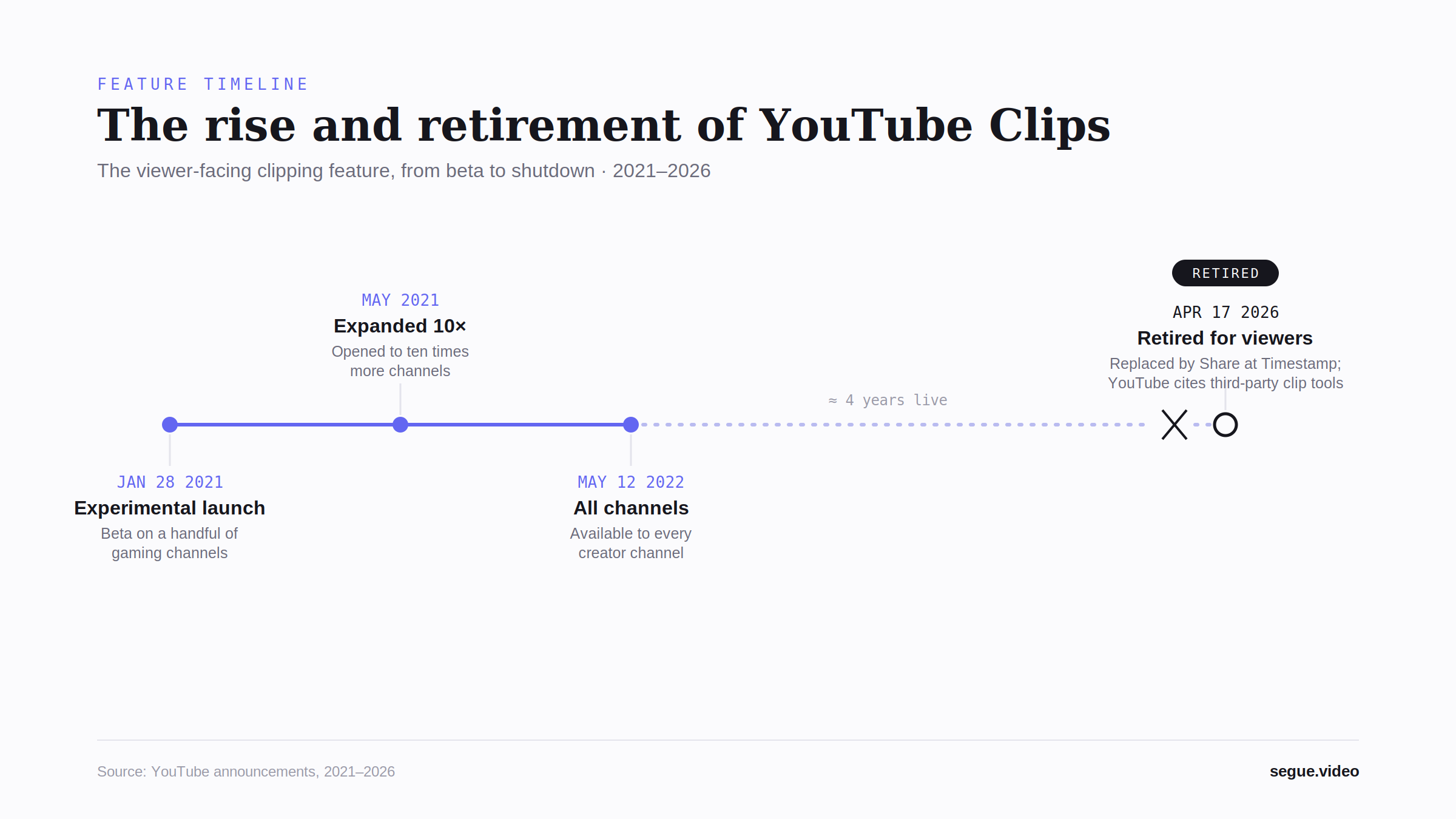
On April 17, 2026, YouTube turned off clip creation on every surface: desktop, mobile web, and the app. Five capabilities went with it, the five that Clips uniquely combined:
- A start and end time on any public video, between 5 and 60 seconds.
- A custom title for the moment, separate from the source video's title.
- A dedicated
/clip/<id>page that opened a stripped-down player focused on just the clipped range. - View credit to the source creator. Every play of a clip counted toward the original video.
- A playable unfurl on Discord, X, Reddit, Slack, and Substack. A
/clip/link expanded into an inline player.
One thing did not change: clips that already exist still play. Only the ability to make new ones is gone.
What still works
Two things survived the cut.
Your old /clip/<id> links still play. Creation went away, playback didn't, at least for now. If you'd rather not leave the moments you rely on riding on a retired feature, Segue imports them: sign in, paste the /clip/ URL into the studio, and its start and end come across automatically.
Share-at-Timestamp still works, but it isn't a replacement. The ?t= parameter sets only a start time. No end time, no custom title, no dedicated page. The video just opens on the full watch page at that second.
So the gap is specific. It's the create a bounded, titled, shareable moment workflow that disappeared, not YouTube sharing in general.
Why did YouTube remove Clips?
YouTube didn't publish a detailed rationale. Its deprecation note pointed users outward, saying, verbatim:
"a number of third-party tools with advanced clipping features and authorized creator programs are now available."
Read plainly: YouTube decided the clipping workflow was better served by the ecosystem than maintained as a native feature, and handed it off.
What to use instead
It depends on the job you're actually doing.
You want to share a moment from someone else's video. That's the old Clips job, and Segue is the closest match. You paste any public YouTube URL, mark a precise start and end, optionally chain several moments into one sequence, and share a single segue.video/m/<slug> link that plays in a clean viewer. It's free with no account, up to 3 clips per mix. Every play streams through YouTube's own player, so views still credit the creator. Pro adds unlimited clips and multi-video mixing within a single channel. This is the like-for-like replacement, covered in full in the Segue vs YouTube Clips head-to-head.
You want AI to find Shorts inside your own long-form video. Different job. An auto-clipper like Opus Clip does it, re-exporting vertical Shorts from footage you own rather than making a share link into someone else's video.
You want to edit and re-export video. Also a different job, and one that detaches the clip from the source, so the original creator gets no view credit.
For the wider landscape and how each option stacks up, see what replaced YouTube Clips and the post-mortem on the deprecation.
Want the workflow back right now? Open the studio, paste a URL, and mark your first clip. No account needed.
Skip the comparison shopping.
Open Segue, paste a YouTube URL, set in and out points, share one link. Free tier, no account.
Frequently asked questions
Is YouTube Clips gone?
Yes. YouTube retired the viewer-side Clips feature on April 17, 2026. You can no longer create a new clip from a video. Clips you already made still play for now, but the create button is gone everywhere: desktop, mobile web, and the app.
Did YouTube remove the clip feature?
Yes. The clip button (the scissors icon under the player) was removed for viewers on April 17, 2026, across desktop, mobile web, and the app. Creators keep a separate Video Clips tool inside YouTube Studio, but it only works on their own uploads.
When did YouTube remove Clips?
April 17, 2026. That's the date YouTube turned off clip creation across all surfaces. There was no phased rollout. The create flow simply disappeared that day.
Can I still create a YouTube Clip?
No. Creating new clips is gone. The closest like-for-like replacement is a third-party tool. Segue sets a start and end point on any public video and gives you a dedicated share link, which is the workflow Clips used to provide.
Do my old /clip/ links still work?
For now, yes. Existing /clip/<id> URLs still play, because only creation was removed, not playback. But YouTube's track record on deprecated surfaces makes the old pages a poor long-term bet, so it's worth moving the ones you rely on somewhere that doesn't depend on a retired feature staying alive. Segue imports them directly: paste the /clip/ URL into the studio while signed in and the clip's start and end points come across automatically.
Why did YouTube remove Clips?
YouTube didn't give a detailed reason, but its deprecation note pointed users to third parties, stating that "a number of third-party tools with advanced clipping features and authorized creator programs are now available." In other words, it handed the workflow to the ecosystem rather than maintaining it natively.
What replaced YouTube Clips?
Nothing native with the same capability. YouTube's Share-at-Timestamp only sets a start time, with no end time, no custom title, and no dedicated share page. The closest functional replacement is Segue, a free browser tool that restores end times, multi-clip sequencing, and a dedicated shareable player.
Is there a free alternative to YouTube Clips?
Yes. Segue is free with no account: mark in and out points on any public YouTube video and share up to 3 clips per mix as one link. Pro ($5/month, $29/year, or a $59 launch-window lifetime) adds unlimited clips and multi-video mixing within a channel.